Operation
The operations is concerned with the manipulation of the structure, such as removing, rotating, and modifying the atoms. WEAS allow you to roll back and redo the operations.
Python API
The operations can be accessed through the viewer.ops object. The operations are divided into different categories:
mesh
atoms
selection
transform
object
Mesh
For example, to create a new mesh primitive:
viewer.ops.mesh.add_sphere()
viewer.ops.mesh.add_cube(position = [5, 0, 0], size=2.5)
Atoms
# replace selected atoms with a new atom
viewer.ops.atoms.replace(symbol = "N")
# add selected atoms to a group
viewer.ops.atoms.add_to_group(group = "molecule")
# remove selected atoms from a group
viewer.ops.atoms.remove_from_group(group = "molecule")
# clear a group from all atoms
viewer.ops.atoms.clear_group(group = "molecule")
Selection
viewer.ops.selection.select_all()
viewer.ops.selection.invert_selection()
viewer.ops.selection.select_by_group(group = "molecule")
Transform
viewer.ops.transform.translate(vector = [5, 0, 0])
Object
viewer.ops.object.delete()
Operation history
Undo & Redo
The Undo and Redo buttons on the top right of the screen allow you to roll back and redo the operations.
Adjust last operation
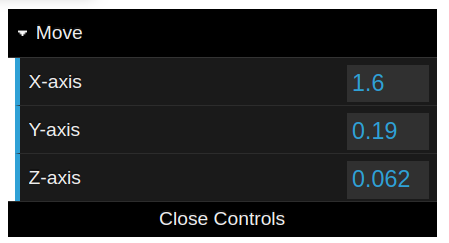
You can adjut the parameters of an operator after running it. After your operation, a panel will pop-up in the bottom left. Alternatively, you can click l (lowcase L) key to pop-up the panel.
For example, if your last operation was a movement, The panel will show you the last value changed for the movement vector, where you can adjut the value and apply it again.