Mesh Primitive
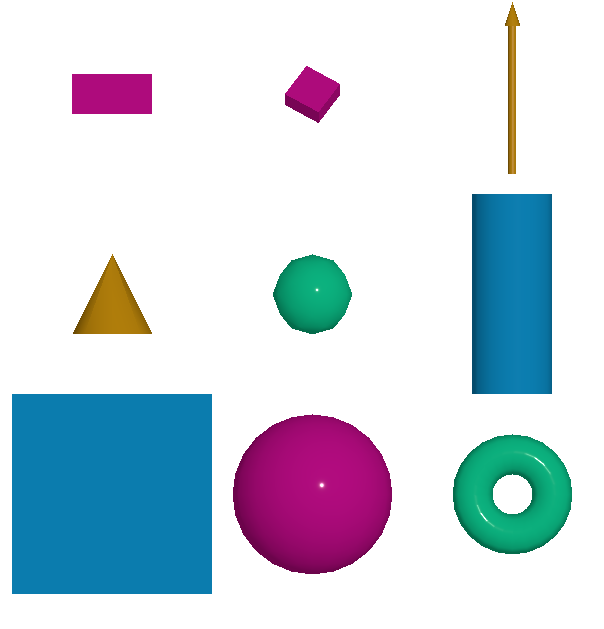
This module allow user to draw custom geometry. The supported geometry are:
plane
box
sphere
cylinder
icosahedron
cone
torus
arrow
Color
The transparency of the color can be set by using the opacity parameter.
Example
The following example shows how to use the mesh primitive to draw two cubes and a sphere.
[1]:
from weas_widget import WeasWidget

viewer = WeasWidget()
data = [
{
    "type": "cube",
    "materialType": "Standard",
    "opacity": 0.5,
    "shape": {
        "width": 1,
        "height": 1,
        "depth": 1
    },
    "instances": [
    {
                "position": [-5, 0, 0],
                "size": 2,
                "scale": [1, 0.5, 1],
                "rotation": [0, 0, 0]
            },
            {
                "position": [5, 0, 1],
                "size": 1,
                "scale": [1, 0.5, 1],
                "rotation": [1, 1, 0],
                "color": "#bd0d87"
            }
    ]
},
{
    "type": "cylinder",
    "shape": {
        "radiusTop": 1,
        "radiusBottom": 1,
        "height": 1,
        "radialSegments": 12,
        "heightSegments": 1
    },
    "instances": [
    {
                "position": [0, 0, 0],
                "segments": 12,
                "radius": 1,
                "scale": [1, 5, 1],
                "rotation": [0, 0, 0],
                "color": "#0d87bd"
            }
    ]
},
]
viewer.imp.settings = data
viewer
[1]:
Primitive Parameters
Cube
The cube is defined by the following parameters:
{
 "position": [0, 0, 0],
 "size": 2,
 "scale": [1, 1, 1],
 "rotation":[0, 0, 0],
 "color": "#bd0d87",
 "materialType": "Standard",
}
Cylinder
The cylinder is defined by the following parameters:
{
 "position": [0, 0, 0],
  "segments": 12,
  "radius": 1,
  "depth": 2,
  "scale": [1, 1, 1],
  "rotation":[0, 0, 0],
  "color": "#bd0d87",
}
Sphere
The sphere is defined by the following parameters:
{
 "position": [0, 0, 0],
  "widthSegments": 8,
  "heightSegments": 6,
  "radius": 1,
  "scale": [1, 1, 1],
  "rotation":[0, 0, 0],
  "color": "#bd0d87",
}
Plane
The plane is defined by the following parameters:
{
 "position": [0, 0, 0],
  "size": 2,
  "scale": [1, 1, 1],
  "rotation":[0, 0, 0],
  "color": "#bd0d87",
}
Icosahedron
The icosahedron is defined by the following parameters:
{
 "position": [0, 0, 0],
  "radius": 1,
  "detail": 2,
  "scale": [1, 1, 1],
  "rotation":[0, 0, 0],
  "color": "#bd0d87",
}
Cone
The cone is defined by the following parameters:
{
 "position": [0, 0, 0],
  "segments": 8,
  "radius": 1,
  "height": 2,
  "scale": [1, 1, 1],
  "rotation":[0, 0, 0],
  "color": "#bd0d87",
}
Arrow
The arrow is defined by the following parameters:
{
 "position": [0, 0, 0],
  "direction": [0, 0, 1],
  "length": 1,
  "color": "#bd0d87",
  "materialType": "Standard",
}
Torus
The torus is defined by the following parameters:
{
 "position": [0, 0, 0],
  "radius": 1,
  "tube": 0.4,
  "radialSegments": 8,
  "tubularSegments": 6,
  "scale": [1, 1, 1],
  "rotation":[0, 0, 0],
  "color": "#bd0d87",
}
Tip
Please check the three.js documentation for more information about the parameters.